
The Caversham
Website for a golf course with a focus on high quality photography, bespoke functionality, and ease of editing for non-technical staff members.
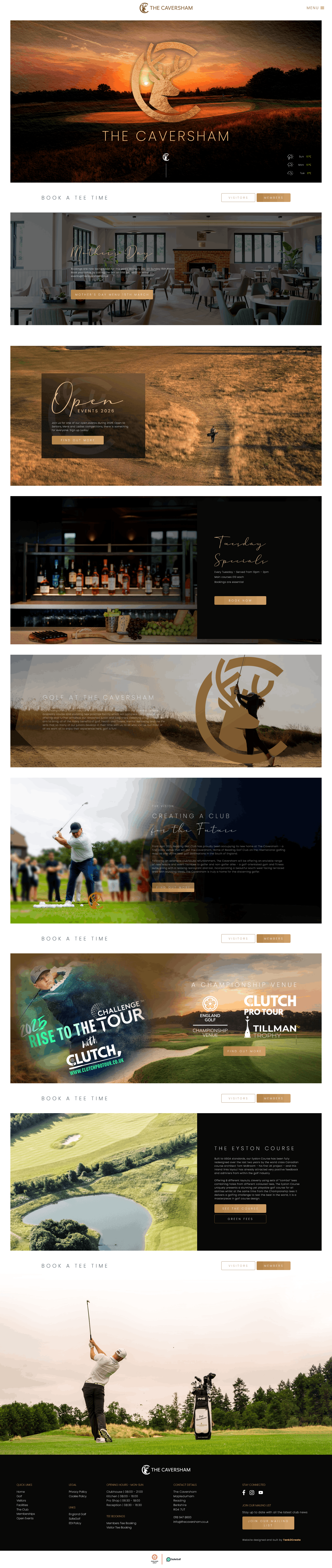
Project highlights
- High quality images requires careful consideration for image compressing and preventing slow load times
- Custom homepage header that changes on each page load for each website visitor
- Easily editable content that can be edited by non-technical staff members at The Caversham
- Custom hole overview post/page type & template
- Custom gallery page with inline accordion galleries
- Blog & Event post type management
- Custom weather widget
- Custom scrolling animations making the website feel less static
This was a very challenging but rewarding website to build and probably the one I am most pleased with. There was a lot of custom functionality and post types needed on this website, and it needed to be built with non-technical members of staff at the golf course needing to add & edit content.
The general layout is very simple - which I was very thankful to the designers for - but the functionality of certain sections & pages were more intricate.
The header slideshow on the homepage is one of the more complex elements. This is very customisable, allowing for a custom number of slides, their duration to be set on a per slide basis, the transition speed to be changed, the tagline that appears after "The Caversham" to be changed, and the Caversham logo and "The Caversham" text can also be customised if needs be.
However, the key part is that multiple slideshows can be added, and each time a user visits the website, they will be shown the next slideshow in order from when they last visited. I made use of cookies to track which slideshow a user should be shown and it works a treat.
A part of the website I am particularly pleased with is "The Eyston Course" page and its corresponding hole overview pages. Each hole of the course has its own page with a overview graphic (which when clicked on shows a close-up of the green), the course data in a handy side panel, description, and video overview. There is also a fantastic photo of the hole from the tee that is the image at the bottom of each hole overview page.
At a golf course, events are a given so the website needed a way to manage events. They didn't require a full event management system - they have their own bespoke system so the website just needs to link off to the booking pages - but they still needed a way to add event listings to the website with external links. I made these so that they are quick and easy to manage in the backend, so that non-technical users can quickly add an event listing to the website.